
Sewing and Fabric Store Point of Sale
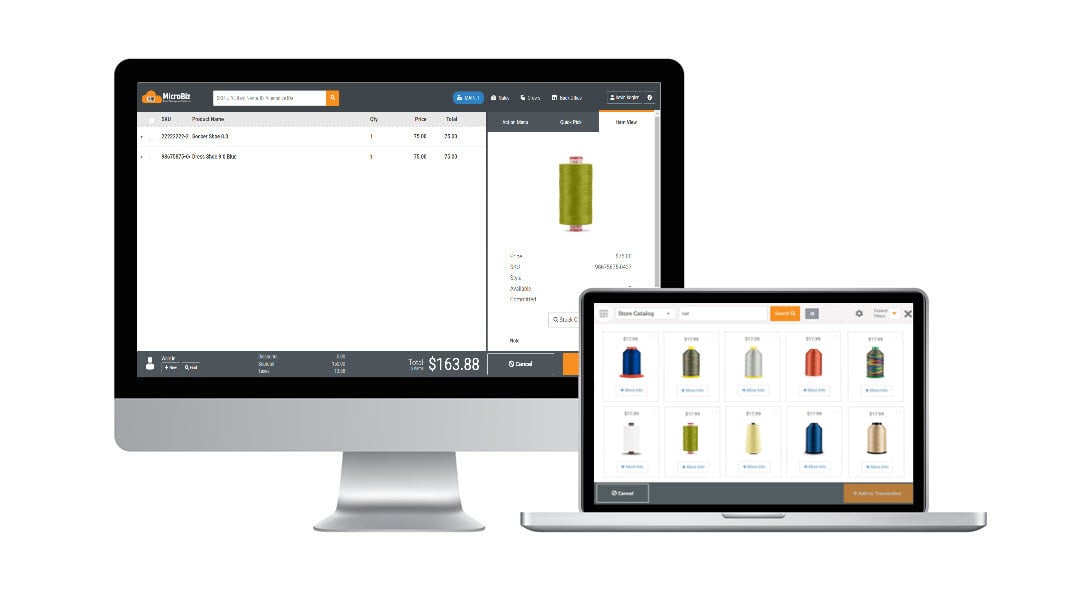
The best sewing and quilt store POS systems support the needs of specialized retailers selling to people who love to sew! Specialized sewing and fabric store retail management systems must be able to track inventory, track customer purchases and manage prices. Many sewing and quilt retailers sell items not in stock, such as sewing machines, that must be specially ordered from the vendor - so the ability to manage special orders is critical for the quilting store's point of sale software. In addition, many of the items sold in sewing and quilting stores, such as threads and related articles, come in a variety of sizes and colors - so support of configurable or matrix items is very important.
Sewing and Quilt Store POS features in MicroBiz Cloud include:
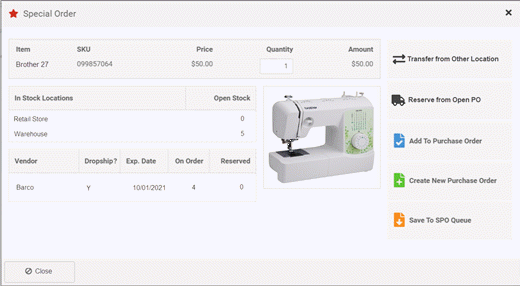
- Special orders/Backorders - Allows you to track special order items, from the customer order to receiving, to inventory to the POS transaction.
- Matrix products (size/color/other) – Manage products that come in different size/color variants.
- Special customer-based group pricing levels or discounts - Set up discounts or pricing tiers based on customer level or group.
- Layaways - Collect deposits on large ticket items such as sewing machines while holding the item out of inventory.
- Markdown management - Easily manage group markdowns, quantity pricing, multi-buy items and promotional pricing.
- Product ID tracking - Provides a detailed record of merchandise, when it was received, what it cost, which customer purchased it, and when it was sold.
- Phone orders – Accept orders and collect payments from customers calling to order by phone.
- Repairs/Service department management – Manage alterations and repair services transactions, including ability to check in a customer-owned item and enter a detailed description of work to be performed.
- Service item history – Track and view service history of customer-owned items checked in for service work, such as sewing machines.
- Customer deposits - Accept and track customer deposits on items such as sewing machines.
- Advanced filterable product search – Search for and view items by filtering by style, category, brand, vendor, size, color.
- Customer sales history look-up – Look-up customer purchases by item or transactions from the front register.
- Pick-up, shipping, delivery dashboard – Manage orders to be shipped, picked-up or delivered.
- Sales commissions - Can be calculated on the sales amount or the gross profit or track commissions by employee to measure productivity.
Inventory Management
Fabric bolts sold by the yard, notions counted by the piece, patterns, and machines priced in the hundreds — few retail catalogs span this many units of measure and price points at once. MicroBiz Cloud is built to handle that mix without forcing everything into one format.
Inventory management capabilities in MicroBiz include:
- Connect to the electronic product catalogs of major sewing and quilt vendors to quickly add new items, including size/color variants, images, cost, and description
- Bulk import products, customers, and inventory levels from your existing POS system via CSV or Excel file
- Import bulk vendor price updates via CSV when a fabric or notions supplier releases a new price list
- Print barcode price labels in multiple formats directly from MicroBiz — automatically during receiving or manually for price changes
- Set quantity-based price break points that automatically adjust the price at the register when a purchase threshold is reached
- Set up customer-based pricing tiers — such as retail or quilting guild member pricing — with prices applied automatically at the register when a customer record is attached
- Set reorder points on fast-moving fabric bolts, thread, and notions to alert staff when stock is running low
- Transfer inventory between store locations and view stock levels across all locations from the register
The result is a catalog that treats a bolt of fabric and a $2,000 embroidery machine with the same accuracy, without forcing either into an awkward workaround.
Speed Product Creation with an Online Product Catalog
New fabric lines, patterns, and notions show up from vendors constantly, and hand-keying each one into the catalog is time better spent on the sales floor. MicroBiz Cloud connects directly with the electronic catalogs of major sewing and quilt vendors to skip that step.
Product catalog lookup capabilities in MicroBiz include:
- Search vendor catalogs by SKU, UPC, or product name
- Populate a new product record with one click, including size/color variant, image, cost, MSRP, and description where available from the vendor
- Access product data from major sewing and quilt vendors
What used to take several minutes of manual entry per item becomes a single click, even when a new fabric line arrives with a dozen colorways at once.
Manage Sewing Machine Repair Work Orders
MicroBiz Cloud includes a full work order module that allows sewing and fabric retailers to manage sewing machine repairs and service jobs alongside retail sales from a single system — without needing a separate service management tool.
Work order capabilities in MicroBiz include:
- Check in a customer's sewing machine and print a claim tag at intake
- Record a detailed description of the repair work to be performed
- Collect a deposit at the time of check-in
- Bill for labor and any parts or materials used in the repair
- Print a full page quote or invoice showing due dates, parts, service charges, and amount due
Having sewing machine repair work orders built directly into MicroBiz gives sewing and fabric retailers a complete picture of every customer's service history alongside their retail purchase history — making it easy to reference past repairs and provide faster, more informed service when a customer returns.
Track Service History on Customer-Owned Items
Knowing whether a sewing machine is still under warranty, or what was repaired last time, shouldn't depend on a staff member's memory. MicroBiz Cloud keeps that history attached to the customer record automatically.
Service history tracking in MicroBiz includes:
- View all items a customer has brought in for repair from their customer record
- Access the full service history for each item, including past work orders, descriptions of work performed, parts used, and dates of service
For higher-value machines especially, that saved history gives technicians the context they need before they even open the case.
Quotes, Estimates and Invoices
Whether it's a sewing machine repair, a special order machine, or a fabric order tied to a customer's project, having a firm price up front matters. MicroBiz Cloud produces that quote from the order record and turns it into an invoice with one click once the customer's ready.
Quote, estimate, and invoice options in MicroBiz include:
- Print a full page quote, estimate, or invoice depending on the current need
- Choose whether order-level or line-level notes are included on the printed document
- Convert a quote into an order with one click to reserve stock and begin collecting payments
Nothing about the item, pricing, or customer record needs to be re-entered between the quote and the sale.
Special Orders
Sewing and quilting stores often offer repair, customizations and alteration services. With the service department management features in MicroBiz, you can check in multiple customer items (such as a sewing machine) and print claim tags. Enter description of work to be done and service notes. Print quotes and invoices which show due dates, charges for items and services (such as parts and labor) and amount due. Collect deposits from customers on work orders and set minimum deposit rules.
Manage Layaway Payments and Installment Sales
A sewing or embroidery machine is often expensive enough that a customer wants to pay it off over time rather than all at once. MicroBiz Cloud gives sewing and fabric retailers a way to manage that without losing track of the item.
Layaway payment management in MicroBiz includes:
- Set due dates on layaway orders to track expected payment milestones
- Accept payments against open layaway orders at any time
- View the full payment history on each open layaway order
- Layaway items are automatically held out of open stock and classified as committed stock for the duration of the layaway
The reserved machine shifts to committed stock, so it stays off the floor and out of reach of another customer until it's paid off.
Serial Number Tracking
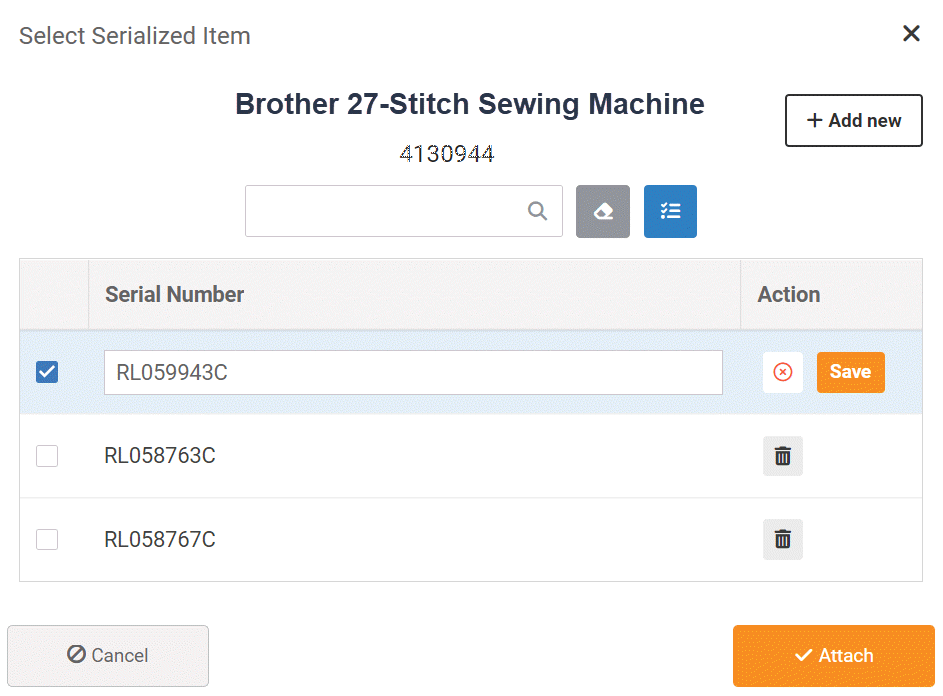
MicroBiz supports the tracking of serialized inventory or tracking of serial numbers on items such as sewing machines. You can set whether an item has serial numbers and whether the tracking of serial numbers is required or optional. Serial numbers can be added when the item is received into inventory, from the product record or when an item is sold. The system supports the scanning of bar codes of serial numbers. Serial numbers can be viewed for both sold and unsold items.
For more information on serial number tracking, click here.
Print Barcode Price Labels
A shipment of new bolts, patterns, and notions isn't ready to sell until every item is tagged — and doing that by hand slows down restocking. MicroBiz Cloud prints those price tags directly from the system.
Barcode price label printing in MicroBiz includes:
- Print price tags in multiple formats including tags with barcodes
- Automatically print price tags as part of the receiving process
- Manually reprint tags for individual items when prices change
- Add labels to a print queue for batch printing at a later time
With labels printing automatically during receiving, new stock hits the shelf already tagged and scannable — no separate labeling pass required.
Sell Sewing Kits and Fabric Bundles
A project kit bundling fabric, pattern, thread, and notions — or a beginner quilting starter kit — sells better as one price than as four separate line items. MicroBiz Cloud's kit feature supports that without losing the component-level detail.
Kit and bundle capabilities in MicroBiz include:
- Sell multiple component products together as a single kit item at the register or on an order
- Automatically relieve inventory on each component product when the kit is sold
- Price the kit as a package price, separate from the sum of the individual component prices
Each component's inventory still adjusts correctly behind the scenes — staff just sell the finished project kit.
Sell Fabric by Fractional Quantities
MicroBiz allows sewing and fabric retailers to sell fabric and trim in fractional quantities — by the yard, meter, or other unit of length — rather than being limited to whole-unit sales.
For example, you can sell 2.75 yards of fabric cut from a bolt, or a specific fractional length of ribbon or trim, with the register calculating the price based on the exact fractional quantity sold.
This is essential for fabric retailers, where nearly all fabric sales involve cutting a precise length from a bolt — ensuring accurate pricing and inventory tracking on every cut, without needing to round up or down to the nearest whole unit.
Tiered Pricing by Quantity
A quilter buying enough fabric for a full backing deserves a better per-yard rate than someone buying a quarter yard — but that discount needs to apply consistently, not depend on who's working the register. MicroBiz Cloud automates it.
MicroBiz allows sewing and fabric retailers to set price break points based on the quantity purchased. At the register, MicroBiz tracks the yardage or quantity of a given item added to a transaction, and automatically adjusts the price once a purchase threshold is met.
The discount kicks in automatically once a customer buys enough for a larger project — no manual calculation, and no inconsistency between staff members applying it.
Electronic Vendor Catalogs
MicroBiz manages product catalogs of major sewing and quilt vendors, allowing sewing and quilt retailers to quickly and easily add new item records to the MicroBiz POS system with one click, including the available size/color variant, image, MSRP, and description of the product (depending on data available from the vendor). Below are some of the vendor catalogs available in MicroBiz:


Other POS Features for Sewing and Quilt Stores
In addition to the Sewing and Quilt POS specific capabilities listed above, MicroBiz Cloud includes the following standard features and functionality needed to manage sewing and fabric stores stores:
Register
- Register Quick Pick Keys
- Bar code label scanning
- Transaction holds/recalls
- Returns and Voids
- Split Tenders
- Assign Salesperson to Transaction
- Item and Transaction Discount
- Stock-level Look-up (multi-store)
- Print or Email Receipts
- Customer Sales History Look-up
- Register Close/End of Day Reports
- Advanced Filterable Product Search
- Store Credits
- Gift Cards
- Customizable Receipts
- Custom Tenders
- Editable Item Descriptions on Receipt
Integrations
- WooCommerce Integration
- QuickBooks Online Integration
Customers
- Customer Tax Classes/Tax Exempt
- Credit Accounts/Charge to Account
- Multiple Shipping/Billing Addresses
- Accounts Receivable Statements
- Import Customers via CSV File Import
Orders
- Check-in of Customer Items for Alterations and Customizations
- Deposit Collection and Refunds
- Tax Calculation based on Ship Address of Customer
- Pick-up, Shipping, Delivery Dashboard
- Phone Orders/Layaways
- Special Orders (out of stock items)
- Alterations/Service Dept Management
- Quotes/Estimates/Invoices
- Back Order Creation and Filling
Store Management
- Store Transfers
- Employee Roles and Permissions
- Support of Contactless Payments
- Flexible and Filterable Reports
- Enforceable Business Rules on Discounts & Returns
- PCI/PA-DS Compliant
- Minimum Deposit Requirements
Multi-store Inventory Management
- CSV File Import of Products & Inventory
- Minimum Inventory Reorder Points
- Special Order Tracking (critical for scrub stores)
- Purchase Orders/Vendor Shipments
- Inventory Adjustment Audit Records
Catalog Management
- Categories and Sub-Categories
- Product Tax Classes (multiple)
- Quantity-based Tiered Pricing (1 for x, 3 for y)
- Customer-based Pricing/Product Pricing Levels (special customer prices)
- Product images (can be uploaded)
- Time-based Promotional Pricing
- Matrix Products with Size/Color/Other Variants
- Alternate Product IDs
- Print Barcode Price Labels
Expand Functionality of MicroBiz via Integrations with Popular 3rd Party Apps

Publish register batch financials to QuickBooks Online with one-touch
- Map POS financial activities to QuickBooks GL accounts
- Publish register batch financials to QuickBooks with one touch
- Sync revenue, COGS, inventory values, customer liabilities and payments with QuickBooks
- Create QuickBooks invoice payable from received vendor shipments
- Push POS sales taxes to QuickBooks Sales Tax Center for payment management

<< >>

Integrate your POS system with your Woo! ecommerce site
- Link product records and sync changes in product fields from MicroBiz to Woo!
- Automatically adjust stock levels in Woo! for store sales to avoid sales of items not in stock
- Pull online orders into MicroBiz for order and inventory management
- Capture customer records created online in MicroBiz
Frequently Asked Questions
Can this POS handle matrix products with multiple variants — for example, fabric available in multiple colorways, patterns, and widths? +
Yes. MicroBiz supports matrix products with up to three variants, allowing you to set up a single product record for a fabric line and define all available combinations of colorway, pattern, and width. Each combination can carry its own price, SKU, and inventory level. At the register, staff simply select the desired variant from the matrix rather than searching for a separate product record for each option — keeping your catalog clean and your checkout process fast.
Can I sell fabric and other materials in fractional quantities — for example, fabric sold by the yard, half yard, or quarter yard? +
Yes. MicroBiz supports fractional sale quantities, allowing you to sell fabric and other materials in any unit of measure. This means you can sell fabric by the yard, half yard, quarter yard, or any other fractional amount — and enter the precise quantity at the point of sale without needing to create separate SKUs for each cut size. This keeps your product catalog clean while giving you the flexibility to cut and sell fabric accurately at the register.
Does this POS support a large product catalog with thousands of SKUs across fabric, thread, notions, patterns, batting, and sewing machines? +
Yes. MicroBiz supports an unlimited number of product records, making it well suited for sewing and quilt retailers that carry thousands of SKUs across multiple categories. You can organize products into categories and subcategories — for example, separating quilting cotton, apparel fabric, thread, notions, patterns, batting, and sewing machines into their own sections — and use advanced filterable search at the register to quickly find any item. Products can also be assigned to multiple price levels, customer groups, and store locations from the same catalog.
Can I set up customer-based pricing for quilt guilds, sewing clubs, and wholesale customers who buy at discounted prices? +
Yes. MicroBiz supports customer-based pricing tiers that allow you to offer different price levels to different customer groups. You can set up a guild or wholesale pricing tier and assign it to specific customer accounts, so that when a guild member or wholesale buyer purchases from you their discounted pricing is applied automatically at the register without requiring staff to manually override prices. Pricing tiers can be configured as a percentage discount, a fixed dollar amount off, cost plus a defined margin, or a specifically defined price per item.
Does this POS support tiered or quantity-based pricing — for example, a lower price per yard when a customer buys 10 or more yards of fabric? +
Yes. MicroBiz supports quantity-based tiered pricing, allowing you to set price break points based on the quantity purchased. At the register, MicroBiz keeps track of the quantity added to a transaction and automatically adjusts the price when a threshold is reached. For example, you can sell quilting cotton at the regular retail price per yard for purchases under 10 yards, and automatically drop to a lower price when 10 or more yards are purchased in a single transaction — without requiring staff to manually apply discounts.
Does this POS support special orders for specific fabric collections, colorways, or notions that I don't currently have in stock? +
Yes. MicroBiz has a built-in special order workflow that allows you to take customer orders for items not currently in stock, collect a deposit, and track the order through to fulfillment. When the item arrives from your vendor, MicroBiz automatically links it back to the original customer order and alerts you so the customer can be contacted for pickup. This is particularly useful for sewing and quilt retailers who regularly source specific fabric collections, limited colorways, or hard-to-find notions and patterns directly from manufacturers or distributors on behalf of customers.
Can I manage house charge accounts for quilt guilds, schools, or other organizations that purchase on account? +
Yes. MicroBiz includes a full credit account and accounts receivable module. You can set up house charge accounts for quilt guilds, sewing clubs, schools, and other organizational customers, allowing them to purchase on account and pay on a monthly or agreed billing cycle. MicroBiz tracks the full account balance, available credit, and complete transaction history for each account. You can generate and print or email AR statements, set credit limits and payment terms per customer, and support open item accounts receivable — meaning payments can be allocated against specific open invoices rather than simply applied to the oldest balance.
Can I print barcode price labels for fabric bolts and notions directly from the POS system? +
Yes. MicroBiz supports barcode price label printing directly from product records, allowing you to print labels for fabric bolts, notions, patterns, and any other products in your catalog. Labels can be printed on any standard supported barcode label printer and include the product name, price, and barcode for fast and accurate scanning at the register. This is particularly useful for sewing and quilt retailers who need to label individual fabric bolts or price notions and accessories for display on the shop floor.
Does this POS support serial number tracking for sewing machines so I can record the serial number at the time of sale and look it up for warranty and service purposes? +
Yes. Serial number tracking is one of MicroBiz's core inventory features and is particularly valuable for sewing and quilt retailers who sell sewing machines. You can flag any product as serialized and set serial number tracking as required or optional. Serial numbers can be captured when a machine is received into inventory, from the product record, or at the point of sale when the machine is sold. MicroBiz maintains a complete serial number history showing when each unit was received, which customer purchased it, and when it was sold — making warranty lookups and service history tracking fast and accurate. When a customer brings a machine in for repair, you can reference the original purchase and serial number directly from their customer record.
Does this POS support work orders so I can manage sewing machine repairs and service — tracking the machine checked in, work to be performed, parts used, and customer pickup? +
Yes. MicroBiz includes a full work order and service management module well suited for sewing and quilt retailers that offer machine repair services. You can check in a customer's sewing machine, enter a description of the work to be performed, add service notes, and print job tickets. Work orders support billing for both parts and labor, allowing you to charge by the hour or by the job. You can collect deposits on service work, set due dates, assign work to specific employees, and track each job through to completion and customer pickup. The customer record in MicroBiz maintains a full service history for each machine brought in for repair, making it easy to reference past service work when a customer returns.
Does this POS integrate with QuickBooks Online for accounting? +
Yes. MicroBiz integrates directly with QuickBooks Online. With one click you can publish register batch financial data to mapped GL accounts in QuickBooks, including sales revenue, cost of goods sold, taxes, and payment type breakdowns. When you receive inventory from fabric and notion suppliers, MicroBiz can automatically create vendor bill payables in QuickBooks. Sales tax liabilities are also pushed directly to the QuickBooks Sales Tax Center, keeping your books accurate without manual data entry.
Does this POS integrate with WooCommerce so I can sell fabric, patterns, and notions online and sync inventory with my store? +
Yes. MicroBiz integrates directly with WooCommerce, allowing you to publish your in-store fabric, pattern, and notion products to your website with one click. MicroBiz automatically syncs inventory levels between your store and your WooCommerce site, so when a fabric or product sells in-store the stock count on your website updates immediately — preventing overselling of items that are no longer available. Online orders are pulled into MicroBiz for fulfillment and inventory management, allowing you to manage in-store and online sales from a single system.
Can I apply customer payments to specific invoices when managing guild or organizational accounts with multiple open orders? +
Yes. MicroBiz supports open item accounts receivable, which means payments made on a customer account can be allocated against specific open invoices rather than simply applied to the oldest balance. This is particularly valuable for quilt guilds and sewing clubs that may have multiple simultaneous fabric orders, notion purchases, and special orders open at the same time and want to pay off specific orders independently. Open item AR keeps each account clean and organized, and makes it easy to identify exactly which invoices remain outstanding at any point in time.
Does this POS integrate with a barcode lookup catalog so I can quickly add new fabric and sewing products without manual data entry? +
Yes. MicroBiz integrates with a barcode lookup catalog that allows you to search for and instantly import product data by scanning or entering a UPC barcode. When adding a new sewing or quilting product to your catalog, MicroBiz will look up the item and automatically populate the product name, description, and other available product details — eliminating the need to manually key in product information. This is a significant time saver for sewing and quilt retailers who carry a large number of SKUs across fabric, thread, notions, patterns, and sewing machines and frequently need to add new products from multiple vendors.
Useful Links and Resources:
American Sewing Guild (ASG) — The national organization for sewing enthusiasts, with chapters across the United States. ASG connects sewers of all skill levels through local chapter events, education programs, and a national conference, and serves as a key community organization for customers of independent sewing and fabric retailers.
Association of Sewing and Design Professionals (ASDP) — The professional association for custom clothing designers, tailors, and sewing professionals. ASDP provides education, certification, networking, and business resources for professionals in the custom sewing and design industry.
Fabric Shop Network (FabShop) — The leading trade association for independent fabric and quilt retailers worldwide. FabShop provides business education, marketing resources, industry networking, and publishes FabShop News — the premier trade publication for fabric and quilt shop owners.
Craft Industry Alliance — A trade association and online community serving businesses in the craft industry, including fabric, quilting, yarn, and maker retail. Craft Industry Alliance provides market research, business resources, advocacy, and networking opportunities for independent craft retailers and suppliers.
American Quilter's Society (AQS) — The world's largest quilting membership organization, representing quilters and quilt retailers across the globe. AQS publishes books and magazines, provides education resources, and hosts the AQS QuiltWeek shows — major consumer events held in multiple cities annually that bring tens of thousands of quilters together and drive significant retail traffic for quilt shop vendors.
H+H Americas — The premier trade show for the craft, fabric, and fiber arts industry in the Americas, launched to fill the void left by the closure of International Quilt Market. H+H Americas connects fabric retailers, quilt shop owners, and suppliers with manufacturers and designers for product sourcing, education, and industry networking.
International Quilt Festival — The largest annual quilt show in the United States, held each fall in Houston, Texas. Organized by Quilts, Inc., the Festival attracts over 40,000 attendees from more than 25 countries and features over 700 vendor booths, making it a major consumer event and sales opportunity for quilt and fabric retailers.
Sewing and Stitchery Expo — One of the largest consumer sewing events in the Pacific Northwest, bringing together thousands of sewing and quilting enthusiasts with fabric retailers, notions vendors, and sewing machine dealers for classes, demonstrations, and shopping.
Sewing.org — The consumer education website of the American Sewing Guild and the home sewing industry, providing sewing tips, project inspiration, and resources that help drive consumer interest in sewing — benefiting independent fabric and sewing retailers across the country.
Want to Learn More?
Try MicroBiz for Free!
Want to test MicroBiz out for yourself? Sign up for a free 21 day trial of MicroBiz including all its features. No credit card required.
Submit a Question or Request
Have a question about MicroBiz software or a request for our sales team? Submit a request directly to MicroBiz using a web form.
or call us at (702) 749-5353 option 2
Schedule One-on-One Online Demo
Want to see how MicroBiz handles workflows or business needs of your store? Schedule a free one-on-one demo with our sales team.